

使用 Node Exporter 监控 Linux 主机指标
Prometheus Node Exporter 公开了各种与硬件和内核相关的指标。
在本指南中,您将
- 在
localhost上启动一个 Node Exporter - 在
localhost上启动一个 Prometheus 实例,该实例已配置为从正在运行的 Node Exporter 中抓取指标
注意虽然 Prometheus Node Exporter 适用于 *nix 系统,但对于 Windows,有 Windows exporter ,其功能类似。
安装并运行 Node Exporter
Prometheus Node Exporter 是一个单一的静态二进制文件,您可以通过 tarball 进行安装。从 Prometheus 下载页面 下载后,解压缩并运行它。
# NOTE: Replace the URL with one from the above mentioned "downloads" page.
# <VERSION>, <OS>, and <ARCH> are placeholders.
wget https://github.com/prometheus/node_exporter/releases/download/v<VERSION>/node_exporter-<VERSION>.<OS>-<ARCH>.tar.gz
tar xvfz node_exporter-*.*-amd64.tar.gz
cd node_exporter-*.*-amd64
./node_exporter
您应该会看到类似这样的输出,表明 Node Exporter 正在运行,并在端口 9100 上公开指标。
INFO[0000] Starting node_exporter (version=0.16.0, branch=HEAD, revision=d42bd70f4363dced6b77d8fc311ea57b63387e4f)  source="node_exporter.go:82"
INFO[0000] Build context (go=go1.9.6, user=root@a67a9bc13a69, date=20180515-15:53:28)  source="node_exporter.go:83"
INFO[0000] Enabled collectors:                           source="node_exporter.go:90"
INFO[0000]  - boottime                                   source="node_exporter.go:97"
...
INFO[0000] Listening on :9100                            source="node_exporter.go:111"
Node Exporter 指标
一旦 Node Exporter 安装并运行,您可以通过 cURL /metrics 端点来验证指标是否正在被导出。
curl https://:9100/metrics您应该会看到类似这样的输出。
# HELP go_gc_duration_seconds A summary of the GC invocation durations.
# TYPE go_gc_duration_seconds summary
go_gc_duration_seconds{quantile="0"} 3.8996e-05
go_gc_duration_seconds{quantile="0.25"} 4.5926e-05
go_gc_duration_seconds{quantile="0.5"} 5.846e-05
# etc.
成功!Node Exporter 现在正在公开 Prometheus 可以抓取的指标,包括输出中更下方(以 node_ 为前缀)的各种系统指标。要查看这些指标(以及帮助和类型信息),请执行以下操作。
curl https://:9100/metrics | grep "node_"配置您的 Prometheus 实例
您本地运行的 Prometheus 实例需要正确配置才能访问 Node Exporter 的指标。以下 prometheus.yml 示例配置文件将告诉 Prometheus 实例从 localhost:9100 抓取数据,以及抓取的频率。
global:
  scrape_interval: 15s

scrape_configs:
- job_name: node
  static_configs:
  - targets: ['localhost:9100']
要安装 Prometheus,请为您的平台 下载最新版本 并解压。
wget https://github.com/prometheus/prometheus/releases/download/v*/prometheus-*.*-amd64.tar.gz
tar xvf prometheus-*.*-amd64.tar.gz
cd prometheus-*.*
一旦 Prometheus 安装完成,您就可以启动它,使用 --config.file 标志指向您在 上面 创建的 Prometheus 配置。
./prometheus --config.file=./prometheus.yml通过 Prometheus 表达式浏览器探索 Node Exporter 指标
现在 Prometheus 正在从运行的 Node Exporter 实例中抓取指标,您可以使用 Prometheus UI(也称为 表达式浏览器)来探索这些指标。在您的浏览器中导航到 localhost:9090/graph,并使用页面顶部的表达式输入栏来输入表达式。表达式输入栏如下所示。
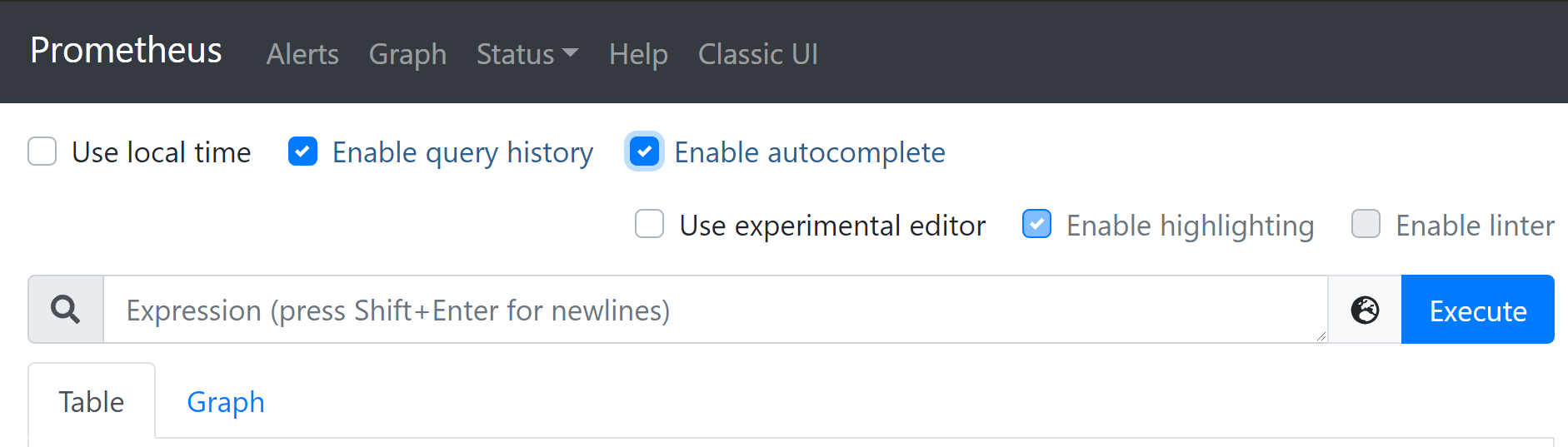
Node Exporter 特有的指标以 node_ 为前缀,包括像 node_cpu_seconds_total 和 node_exporter_build_info 这样的指标。
点击下面的链接查看一些示例指标
| 指标 | 含义 |
|---|---|
rate(node_cpu_seconds_total{mode="system"}[1m]) | 过去一分钟内,每秒在系统模式下花费的平均 CPU 时间(单位:秒) |
node_filesystem_avail_bytes | 非 root 用户可用的文件系统空间(单位:字节) |
rate(node_network_receive_bytes_total[1m]) | 过去一分钟内,每秒接收的平均网络流量(单位:字节) |